


This is the common question that I am encountering in most webtalks and forums with regards to a memory stick. How to recover images that are accidentally deleted in the
memory stick. Actually it may be possible to recover deleted pictures in the memory stick just by using the Memory Stick® File Rescue application. This software is available
as a free download from this link http://esupport.sony.com/perl/swu-download.pl?template=EN&upd_id=%20%202159&SMB=YES .
You can also go to google for more websites where to download memory stick file rescue.
If the Memory Stick File Rescue application is unable to recover the image files, then the Memory Stick media may need to be sent to a professional data recovery service
memory stick. Actually it may be possible to recover deleted pictures in the memory stick just by using the Memory Stick® File Rescue application. This software is available
as a free download from this link http://esupport.sony.com/perl/swu-download.pl?template=EN&upd_id=%20%202159&SMB=YES .
You can also go to google for more websites where to download memory stick file rescue.
If the Memory Stick File Rescue application is unable to recover the image files, then the Memory Stick media may need to be sent to a professional data recovery service


.jpg)


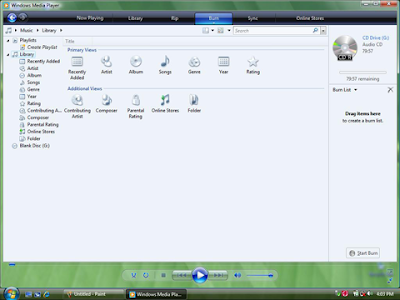 If you want to add all songs of a certain artist then select the artist, right click on him and then select “Add to Burn List”. Also, you can drag and drop any song, album, etc to the burn list from the right side of the Windows Media Player window.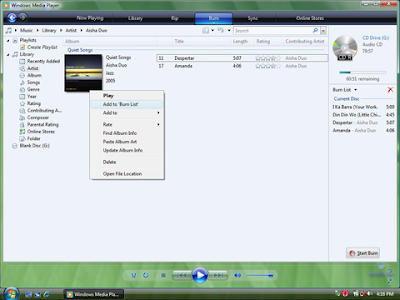




 Posts
Posts


